Amr Elshabrawy
Elshabrawy
HomeAboutServicesWorkContact
Download CV
Amr Elshabrawy
Elshabrawy

Ā© 2026 Amr Elshabrawy. All rights reserved.

Companions Saas App

Companions Saas App

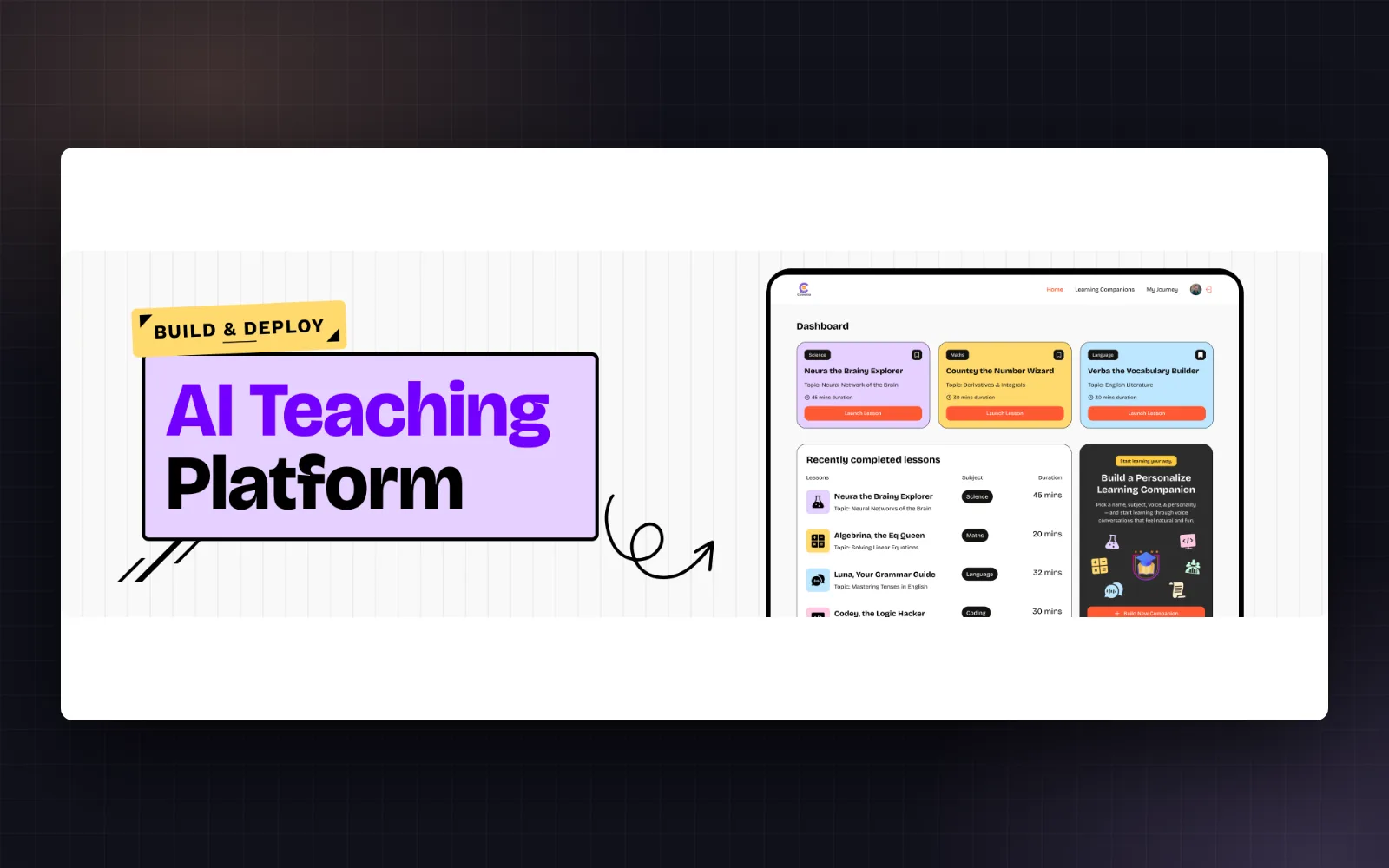
Converso is an innovative real-time AI teaching platform that connects learners with personalized AI companions for interactive educational experiences. Choose from various subjects and embark on engaging lessons powered by advanced AI technology, including voice and video capabilities.

View CodeLive Demo
0 stars
0 forks
Created Aug 23, 2025
1.7 MB

Technologies

TypeScriptclerklucide-reactnextjs

Languages

TypeScript92%
CSS8%
JavaScript1%

README

šŸš€ Converso - Real-time AI Teaching Platform

Version Next.js React

Converso is an innovative real-time AI teaching platform that connects learners with personalized AI companions for interactive educational experiences. Choose from various subjects and embark on engaging lessons powered by advanced AI technology, including voice and video capabilities.

✨ Features

  • šŸ¤– AI Companions: Interactive AI tutors for different subjects (Math, Science, History, etc.).
  • šŸŽÆ Personalized Learning: Tailored lessons based on user preferences and progress.
  • šŸ“¹ Real-time Sessions: Voice and video-powered teaching experiences using Vapi AI.
  • šŸ”– Bookmark System: Save favorite companions for quick access.
  • šŸ“Š Session Tracking: Monitor recent completed lessons and progress.
  • šŸŽØ Modern UI: Beautiful, responsive design with Tailwind CSS.
  • šŸ” Secure Authentication: Seamless user management with Clerk.
  • ā˜ļø Cloud Database: Powered by Supabase for reliable data storage.
  • 🚨 Error Monitoring: Sentry integration for smooth performance tracking.
  • šŸ“ Custom Companions: Users can create their own AI companions with custom subjects, topics, voices, and styles.
  • šŸ” Search and Filter: Easily find companions by subject or topic.

šŸ“ŗ Live Preview

Converso Live Preview

View Live Demo

šŸ› ļø Tech Stack

  • Framework: Next.js 15.5.0 - React-based full-stack framework
  • Frontend: React 19.1.0 - Modern React with hooks
  • Styling: Tailwind CSS v4 - Utility-first CSS framework
  • Database: Supabase - Open source Firebase alternative
  • Authentication: Clerk - Complete user management solution
  • Voice/Video AI: Vapi AI - Real-time communication SDK
  • Monitoring: Sentry - Error tracking and performance monitoring
  • Forms: React Hook Form with Zod validation
  • UI Components: Radix UI for accessible, unstyled components
  • Icons: Lucide React for beautiful, consistent iconography
  • TypeScript: Full type safety throughout the application

šŸ“‚ Project Structure

amr-saas-app/
ā”œā”€ā”€ app/                     # Next.js App Router pages and API routes
│   ā”œā”€ā”€ api/                 # API routes
│   ā”œā”€ā”€ companions/          # Companion-related pages
│   └── ...
ā”œā”€ā”€ components/              # Reusable React components
│   ā”œā”€ā”€ ui/                  # UI components (buttons, forms, etc.)
│   └── ...
ā”œā”€ā”€ constants/               # Constant values and configurations
ā”œā”€ā”€ lib/                     # Library functions and utilities
│   ā”œā”€ā”€ actions/             # Server-side actions
│   └── ...
ā”œā”€ā”€ public/                  # Static assets (images, fonts, etc.)
ā”œā”€ā”€ types/                   # TypeScript type definitions
└── ...                      # Configuration files

šŸ“„ Installation & Usage

Prerequisites

  • Node.js (version 18 or higher)
  • npm or yarn

Setup

  1. Clone the repository

    git clone https://github.com/Amr-Elshabrawy-Dev/companions-saas-app.git
    cd saas-app
    
  2. Install dependencies

    npm install
    
  3. Environment Setup Create a .env.local file and configure the following:

    NEXT_PUBLIC_CLERK_PUBLISHABLE_KEY=your_clerk_publishable_key
    CLERK_SECRET_KEY=your_clerk_secret_key
    NEXT_PUBLIC_SUPABASE_URL=your_supabase_url
    NEXT_PUBLIC_SUPABASE_ANON_KEY=your_supabase_anon_key
    SENTRY_AUTH_TOKEN=your_sentry_auth_token
    NEXT_PUBLIC_SENTRY_DSN=your_sentry_dsn
    
  4. Run in development mode

    npm run dev
    
  5. Open http://localhost:3000 in your browser

Building for Production

npm run build
npm run start

šŸ“œ Scripts

  • npm run dev → Starts the development server with Turbopack for fast reloads
  • npm run build → Builds the application for production with Turbopack optimization
  • npm run start → Runs the production build
  • npm run lint → Runs ESLint to check code quality and style

šŸ¤ Contribution

We welcome contributions! Here's how you can help make Converso even better:

  1. Fork the repository
  2. Create a feature branch: git checkout -b feature/amazing-feature
  3. Make your changes and test thoroughly
  4. Commit your changes: git commit -m 'Add amazing feature'
  5. Push to the branch: git push origin feature/amazing-feature
  6. Open a Pull Request

For major changes, please open an issue first to discuss what you'd like to change.

šŸ“‘ License

This project is licensed under the MIT License - see the LICENSE file for details.


🌐 Let's Connect

Portfolio WhatsApp GitHub LinkedIn Email Twitter


Amr Elshabrawy Logo

Created with šŸ’š and ā˜• by AMR ELSHABRAWY
Ā© 2025 | All Rights Reserved | Keep coding šŸš€