Amr Elshabrawy
Elshabrawy
HomeAboutServicesWorkContact
Download CV
Amr Elshabrawy
Elshabrawy

© 2026 Amr Elshabrawy. All rights reserved.

Weather App

Weather App

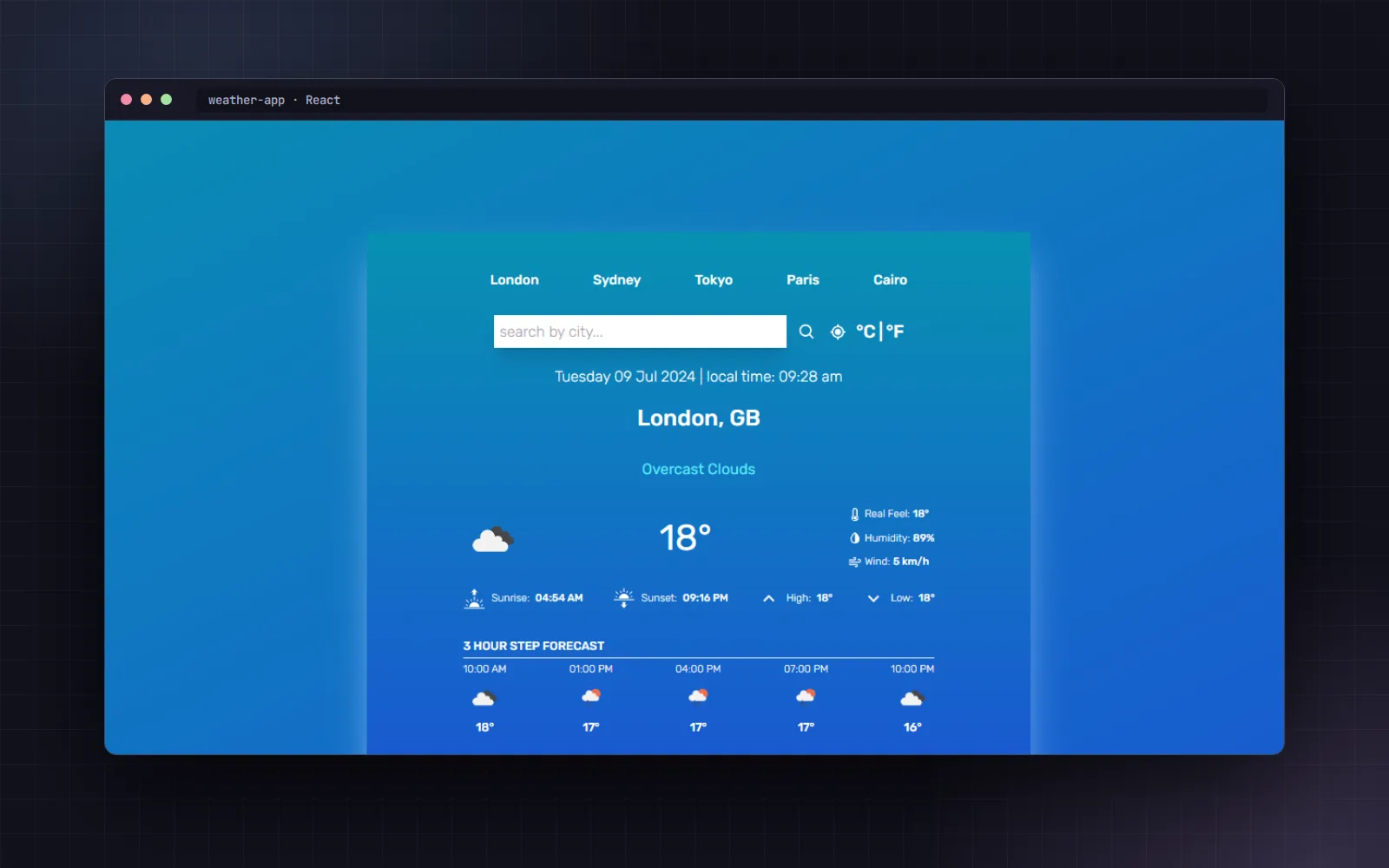
This project is a weather application built using React. The application fetches weather data through an API and displays it to the user. It also uses a state management system to store weather data and improve performance.

View CodeLive Demo
1 stars
0 forks
Created Jul 9, 2024
3.4 MB

Technologies

JavaScriptfetch-apinavigator-geolocationreact

Languages

JavaScript96%
CSS2%
HTML2%

README

Weather Application Project

Weather App Website Home page

👁️ Project Preview

  • Live Preview 👉 https://amrelshabrawydev.github.io/weather-app

  • Github Repo 👉 https://github.com/AmrElshabrawyDev/weather-app

  • 🚩 For any reason contact me.


👏 Introduction

This project is a weather application built using React. The application fetches weather data through an API and displays it to the user. It also uses a state management system to store weather data and improve performance.


🛠️ Tools and Technologies Used

React

  • 📝 Description: A library for building user interfaces.
  • 👨‍🍳 Usage: React was used to create the UI components, manage state, and handle user interactions.

useContext

  • 📝 Description: Part of React for managing global state.
  • 👨‍🍳 Usage: useContext was used to store and share weather data between different components.

useState

  • 📝 Description: A hook for managing local state in functional components.
  • 👨‍🍳 Usage: useState was used to manage local states such as query, units, and message.

useEffect

  • 📝 Description: A hook for performing side effects in functional components.
  • 👨‍🍳 Usage: useEffect was used to perform data fetching operations when the query and units state changes.

useCallback

  • 📝 Description: A hook to optimize functions that depend on stable references.
  • 👨‍🍳 Usage: useCallback was used to optimize functions such as handleLocation and fetchWeather.

useMemo

  • 📝 Description: A hook to optimize computed values that depend on stable references.
  • 👨‍🍳 Usage: useMemo was used to compute the UI background based on the temperature.

Fetch API

  • 📝 Description: An interface for fetching resources across the network.
  • 👨‍🍳 Usage: Fetch API was used to fetch weather data from the API.

navigator.geolocation

  • 📝 Description: An interface for obtaining the user's geographical location.
  • 👨‍🍳 Usage: navigator.geolocation was used to get the user's coordinates to determine the weather location.

Tailwind CSS

  • 📝 Description: A utility-first CSS framework for rapid UI development.
  • 👨‍🍳 Usage: Tailwind CSS was used to style the application, providing a responsive and modern design with minimal effort.

React Icons

  • 📝 Description: A library for including popular icons in React projects.
  • 👨‍🍳 Usage: React Icons was used to include icons in the application, enhancing the visual appeal and user experience.

✨ Features

  • Interactive UI: The application provides an interactive and user-friendly interface.
  • Efficient State Management: Using Context API for state management makes it easy to share data between components.
  • Performance Optimization: Using useCallback and useMemo helps improve the application's performance.
  • Error Handling: The application handles errors well and displays appropriate messages to the user.
  • Device Compatibility: The application uses geolocation to obtain the user's location, increasing the accuracy of the provided data.

🐛 Drawbacks

  • Internet Dependency: The application relies entirely on an internet connection to fetch weather data.
  • Geolocation Error Handling: If the user denies access to their location, a default location (like Cairo) is used, which may not be accurate for all users.

How to Run

  1. Install dependencies:

    npm install
    
  2. Run project:

    npm run dev
    

👋 Get In Touch

  • 🌐 My Website 👉 https://amrelshabrawydev.github.io
  • 👔 LinkedIn 👉 https://www.linkedin.com/in/amr-elshabrawy-dev
  • 🌟 Github 👉 https://github.com/AmrElshabrawyDev
  • 📧 Gmail 👉 amrelshabrawy.dev@gmail.com
  • 🐤 Twitter 👉 https://twitter.com/AmrElshbrawy217
  • ☎️ Whatsapp 👉 (+20) 120-254-6653

AMR ElSHABRAWY

Created by AMR Elshabrawy